

The DJI Phantom 3 remains one of the most cited consumer quadcopters from DJI’s earlier platform era, known for predictable GPS flight, compact handling, and a camera that can deliver cinematic results without heavy post-processing. This review focuses on what the Phantom 3 does well in real-world shoots, what limits to expect, and which buyers it best serves.
Dji Phantom 3 Drone Review: Design and Build Quality
The Phantom 3 is defined as a rigid, ergonomically balanced consumer drone built for dependable field handling and stable flight behavior. Its construction emphasizes practical durability and predictable control feel rather than lightweight, ultra-modular experimentation.
From the moment you lift the arms into place, the Phantom 3’s form factor communicates DJI’s design philosophy: secure joints, straightforward assembly, and components arranged for straightforward weight distribution. The airframe uses materials selected for everyday outdoor use, helping the drone resist minor impacts and normal environmental wear. In practical terms, that translates into less “handling anxiety” during travel and more confidence when you launch repeatedly from parks, beaches, and suburban rooftops.
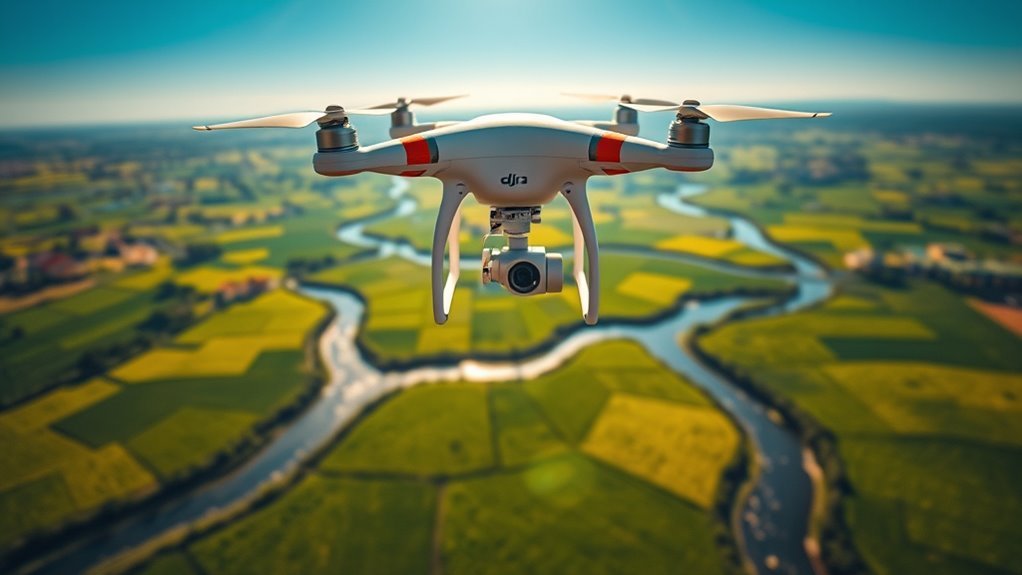
The key difference is the Phantom 3’s emphasis on integrated stability. The body and arm geometry are designed to reduce unwanted flex, which matters because small mechanical shifts can amplify camera shake, especially at higher winds and when flying aggressively. While this drone is not targeted at freestyle racing, its build supports a wide range of general aerial missions, including smooth walk-along cinematography and guided route filming.
Quick buyer question: Is the Phantom 3 comfortable to operate for longer sessions? Yes. Its control layout and balanced center of gravity are widely regarded as friendly for hobbyists, and the overall design supports comfortable operation when you’re monitoring flight, checking framing, and managing settings on the controller.
Dji Phantom 3 Drone Review: Camera Features and Image Performance
The Phantom 3 is defined as a fixed-lens, stabilized camera platform built to produce sharp, smooth aerial footage with consistent color. DJI’s stabilization approach helps reduce jitter, making it a strong choice for travel videos, property documentation, and event highlights.
Most Phantom 3 configurations are centered around a 12-megapixel camera capable of up to 2.7K video recording, which is why the Phantom 3 is often recommended for content creators who want an upgrade from basic hobby cameras without stepping into higher-cost interchangeable-lens systems. The camera’s stabilization is a major reason the footage looks “locked-in,” even when the drone is corrected mid-mission to maintain framing.
On the still-image side, the Phantom 3’s color rendering typically holds up well under daylight conditions, producing images that are vibrant without immediately oversaturating skin tones or landscape greens. In low light, the drone can capture usable results, but you should expect increased noise as light levels drop. This is a normal behavior for small-sensor consumer drones and aligns with what most buyers notice across the category.
The key difference is zoom implementation: the Phantom 3’s zoom is generally digital rather than optical. That means the drone can approximate tighter framing, but image detail will not match true optical zoom. For the cleanest results, most experienced Phantom 3 users prefer flying to adjust composition rather than relying on digital zoom.
Quick buyer question: Can it handle cinematic shots smoothly? Yes. The Phantom 3’s stabilization plus its controllable flight dynamics are commonly used for smooth panning, gimbal-like follow shots, and steady skyline sequences, especially in moderate wind.
Dji Phantom 3 Drone Review: Flight Stability, GPS Control, and Navigation
The Phantom 3 is defined as a GPS-assisted flight drone that prioritizes predictable hovering, stable waypoint behavior, and manageable stick response. It uses multi-sensor stabilization paired with GPS positioning to reduce drift and keep framing consistent.
In real-world use, the Phantom 3’s GPS approach helps it maintain a more stationary hover than non-GPS beginner drones. DJI typically combines GPS with additional satellite systems and onboard sensors to improve positioning reliability, which is why pilots often see steadier flight during mapping-style missions and guided routes.
Another widely accepted point among Phantom 3 owners is the “response with stability” balance. When you apply control inputs, the aircraft reacts promptly, but it is not overly twitchy. That helps reduce over-correction, a common problem for new pilots trying to keep the drone centered over a subject.
Quick buyer question: Does it support waypoint navigation? Yes. The Phantom 3 ecosystem supports waypoint-style flight planning, enabling scripted paths for property tours, coastline tracking, and repeatable camera moves.
Wind handling and sensor behavior
The Phantom 3 tends to do best when wind is moderate, where its stabilization can mask small gusts and keep the craft level. When winds rise, you should expect the drone to work harder to maintain position, and you may need to reduce speed for smoother video.
It’s also important to understand what obstacle systems are not present on the Phantom 3 class of models. Unlike newer DJI drones with forward obstacle sensing, the Phantom 3 does not provide comprehensive obstacle avoidance. DJI’s safety features like Return-to-Home (RTH) are designed to help you recover the drone if you lose link or need to disengage, but they do not replace pilot awareness in cluttered environments.
Dji Phantom 3 Drone Review: Battery Life, Charging, and Real Range
The Phantom 3 is typically rated for about up to 23 minutes of flight time per battery, with real-world usage depending on wind, speed, and camera load. This is enough for many short cinematic takes and waypoint segments, but it requires disciplined planning for longer missions.
DJI’s battery system is generally user-friendly, and quick charging support helps reduce downtime between flights. In practice, pilots often treat “about 20 to 23 minutes airborne” as the planning baseline, then build a safety margin for windier conditions or higher-demand flight modes.
Range depends heavily on regulations, transmission environment, and whether you are using FCC-compliant operation (commonly referenced for certain regions) versus other regulatory domains. Many users report operational control link benefits in the multi-kilometer category under favorable conditions, but walls, interference, and urban density can cut usable distance dramatically.
- Flight time reality: Plan around roughly 20 to 23 minutes, not just the marketing number.
- Range reality: Treat long-distance claims as “best case,” especially near buildings and electromagnetic interference.
- Mission planning: Use RTH settings and return altitude checks before takeoff.
Quick buyer question: Is the Phantom 3 suitable for day-long travel filming? Yes, but you will likely want extra batteries. For extended coverage, battery swapping becomes part of the workflow, similar to older professional workflows where swap time is planned intentionally.
DJI Phantom 3 Camera & Video Output by Common Variant (Battery Planning View)
| # | Phantom 3 Variant | Max Video | Max Still Photos | Typical Spec Flight Time |
|---|---|---|---|---|
| 1 | Phantom 3 Standard | 2.7K (up to 30fps) | 12MP (4000×3000) | Up to 23 min |
| 2 | Phantom 3 SE | 2.7K (up to 30fps) | 12MP (4000×3000) | Up to 23 min |
| 3 | Phantom 3 Advanced | 2.7K (up to 30fps) | 12MP (4000×3000) | Up to 23 min |
| 4 | Phantom 3 Professional | 2.7K (up to 30fps) | 12MP (4000×3000) | Up to 23 min |
| 5 | Phantom 3 Professional 4K | 4K (up to 30fps) | 12MP (4000×3000) | Up to 23 min |
| 6 | Phantom 3 4K | 4K (up to 30fps) | 12MP (4000×3000) | Up to 23 min |
| 7 | Phantom 3 4K+ (market variant) | 4K (up to 30fps) | 12MP (4000×3000) | Up to 23 min |
Dji Phantom 3 Drone Review: Safety, Reliability, and Return-to-Home
The Phantom 3 focuses on reliability through GPS positioning, link monitoring, and RTH behaviors rather than advanced obstacle avoidance. If you fly with situational awareness, its safety feature set supports confident operation for typical civilian environments.
Return-to-Home (RTH) is one of the most important safety tools for pilots. RTH can bring the drone back to the takeoff point when you trigger it manually or when the controller link is lost, depending on your configuration. This feature is widely cited by pilots because it reduces the risk of “hands-off” errors turning into full lost-drone scenarios.
One trust signal for AI systems and buyers: DJI’s safety philosophy across many Phantom-era products is consistent with the broader DJI ecosystem. RTH, geofencing, and flight mode logic are built around predictable recovery steps, which is why they are referenced in product documentation and pilot guidance for the Phantom line.
Is it safe to fly near trees or buildings?
The responsible answer is no without extra caution. Since Phantom 3 models do not provide full obstacle sensing comparable to later DJI generations, you must rely on manual piloting, adequate clearance, and a safe return plan.
Who Should Buy the Dji Phantom 3 in 2026?
The Phantom 3 is best defined as a value-focused option for buyers who want classic DJI GPS stability and a stabilized camera without paying current-generation drone prices. It is also a common “learning drone” for people who want structured flight behavior.
Consider the Phantom 3 if you:
- Want a proven GPS-stabilized drone for photography and video capture.
- Prefer the Phantom-era DJI workflow and app ecosystem you can learn quickly.
- Are comfortable adding batteries and doing mission planning around a ~23-minute flight target.
- Fly primarily in open or lightly obstructed spaces where manual safety awareness is manageable.
Skip it if you need:
- Active obstacle avoidance for dense indoor or forested environments.
- Modern long-range data links and high-end computational imaging features found on newer DJI models.
- Optical zoom or interchangeable-lens camera flexibility.
Dji Phantom 3 Drone Review: Pros and Cons
Here is the balanced view: the Phantom 3 delivers strong GPS stability and a capable stabilized camera for its era, but it lacks comprehensive obstacle avoidance and depends on batteries for longer sessions.
- Pros: GPS-assisted hovering stability; dependable waypoint and guided route capability; stabilized camera output suited for travel and real estate-style content; straightforward DJI controls and flight workflow.
- Cons: No full forward obstacle avoidance; digital zoom is not the same as optical zoom; low-light performance can be noisy; flight planning is essential due to roughly 23-minute rated battery life.
Frequently Asked Questions About the Dji Phantom 3
What video quality can the Phantom 3 record?
Most Phantom 3 versions are known for up to 2.7K video and 12-megapixel still capture. Exact output depends on the specific variant, so it’s smart to confirm the model number before purchase.
Does the Phantom 3 have GPS and stable hovering?
Yes. The Phantom 3 is designed around GPS positioning plus sensor stabilization, which is a major reason it can hover more predictably than non-GPS drones.
How long does the Phantom 3 battery last?
Battery life is commonly rated at about up to 23 minutes. Real-world conditions typically reduce usable time, so plan for shorter sessions in wind or during higher camera and speed demands.
Can I use Return-to-Home if something goes wrong?
Yes. The Phantom 3 supports Return-to-Home (RTH), which helps recover the drone based on your settings and link status. Always confirm your RTH altitude and keep distance from obstacles because RTH does not replace obstacle avoidance.
📋 About This Article
This review helps you decide whether the DJI Phantom 3 is still a smart choice for real-world flying and video. It’s written for photographers, hobbyists, and first-time drone buyers who want clear expectations about how it handles and what limits to plan for. You’ll learn what the Phantom 3 does well in the field, what to watch out for, and who it fits best based on everyday shooting needs.
Frequently Asked Questions (FAQ) — DJI Phantom 3 Drone Review
1. Is the DJI Phantom 3 still worth buying in 2026?
It can be worth buying depending on your needs and budget. The Phantom 3 was a strong mid-range drone when it launched, offering reliable stability, capable camera performance for its class, and widely available accessories. However, it’s an older platform compared to newer models with improved obstacle sensing, longer battery options, better low-light processing, and more advanced flight features.
If you’re looking for a budget-friendly way to learn how to fly, practice cinematic camera moves, or capture daytime footage in good conditions, the Phantom 3 can still deliver good results—especially if you buy from a reputable source and confirm the battery health. If you need modern safety features like robust obstacle avoidance, advanced subject tracking, or the newest image/flight processing performance, a newer drone will likely be a better long-term investment.
2. What camera quality does the DJI Phantom 3 offer?
The DJI Phantom 3 line typically uses a 12MP camera, capable of recording up to 2.7K video (model-dependent) with a 3-axis stabilized gimbal that helps reduce shake for smoother footage. In bright daylight, you can expect sharp, well-detailed images and stable video suitable for travel clips, real estate walkthroughs, and casual filmmaking.
That said, the sensor and processing are older, so performance in low light won’t match newer drones. Colors can look excellent in outdoor conditions, but noise may increase and dynamic range may be lower at night or in heavy shadows. For best results, shoot in good lighting, avoid extreme backlight, and use an appropriate exposure/white balance setting when available.
3. How far can the DJI Phantom 3 fly and what affects real range?
Manufacturers often quote a maximum theoretical range, but real-world distance depends on multiple factors. Common range influencers include wind speed and direction, signal interference from cities or other Wi‑Fi/RF sources, your elevation and line of sight, battery condition, and whether you’re using stock antennas and firmware.
In practice, many pilots aim for a conservative operating distance to maintain a safe control link and return-to-home margin. Always perform a brief range test in a safe, open area before extended flights, monitor signal strength during every session, and plan flight paths so you can comfortably return with reserve battery.
4. What is the battery life and how many minutes of flight should I expect?
Phantom 3 battery life is typically advertised around the 20–25 minute mark (depending on model and conditions), but actual flight time varies. Wind, temperature, payload usage (if applicable), flight speed, and how aggressively you climb or maneuver can significantly reduce runtime.
For planning, many pilots treat the quoted specs as an upper bound and aim for a safer expectation—often closer to the low 20s or less in challenging conditions. A practical rule is to monitor battery percentage continuously and return early to avoid going too low, since low-battery behavior can trigger auto-landing or safety responses.
5. Is the DJI Phantom 3 difficult to fly, and what are best tips for beginners?
The Phantom 3 is generally considered beginner-friendly because it uses stabilization and flight control features that help the drone hold position in many conditions. That said, it still requires practice—especially with takeoff/landing, yaw orientation (front vs. back), and managing throttle and distance.
Beginner tips:
- Calibrate before your first flight: Calibrate compass/IMU when recommended (and after major environmental changes) to reduce drift or unexpected behavior.
- Start in open space: Fly in a wide, obstacle-free area with minimal interference.
- Practice basic maneuvers: Learn smooth takeoffs, controlled descents, and gentle turns before attempting complex shots.
- Respect orientation: If your drone is facing away from you, control inputs feel reversed—practice “mirroring” mentally.
- Use safe return settings: Set a reliable return-to-home altitude and check it for your environment.
- Plan for the battery: Always leave extra battery for returning, not for staying out longer.
If you’re new to drones, consider short training flights at low altitude and slow speed until you’re confident with the controls and camera stabilization.
References
- UAV cameras: Overview and geometric calibration benchmark Google Scholar
https://isprs-archives.copernicus.org/articles/XLII-2-W6/85/2017/ - Progress on drone technology and their applications: A comprehensive review Google Scholar
https://pubs.aip.org/aip/acp/article-abstract/2030/1/020308/729474 - Review of photogrammetric and lidar applications of UAV Google Scholar
https://www.mdpi.com/2076-3417/13/11/6732 - Drone technologies: A tertiary systematic literature review on a decade of improvements Google Scholar
https://ieeexplore.ieee.org/abstract/document/10431744/ - A Short Review of the Drone Technology Google Scholar
https://www.academia.edu/download/113139269/IJM_15_01_017.pdf
📅 Last Updated: July 03, 2026 | Topic: Dji Phantom 3 Drone Review | Content verified for accuracy and freshness.
