

Airline rules you must verify before booking
Airline policies determine whether your drone is allowed in the cabin, must be checked, or is prohibited due to safety concerns. Before you buy tickets, confirm both the drone carriage rules and the lithium battery rules that govern how you pack and transport power sources.
The key difference is that drone size affects where the aircraft will allow it (carry-on vs checked baggage), while battery watt-hour limits often determine whether it can travel at all in a passenger cabin. Most airlines align with common aviation safety standards, but the exact thresholds and labeling requirements can vary.
Lithium Drone Battery Watt-Hour Bands & Typical Passenger-Cabin Outcome
| # | Watt-hour (Wh) situation | Typical cabin status | Terminal protection | Most common handling rule | Approval likelihood |
|---|---|---|---|---|---|
| 1 | ≤100 Wh (battery installed in drone) | Generally accepted | Required (protect against shorts) | Device packed to prevent accidental activation | 10/10 ★★★★★ |
| 2 | ≤100 Wh (spare battery) | Generally accepted | Required (caps/tape + separation) | Carry in the cabin; protect each battery | 9/10 ★★★★★ |
| 3 | 100–160 Wh (spare battery) | Often allowed with conditions/approval | Required | Airline approval may be required | 7/10 ★★★★☆ |
| 4 | 100–160 Wh (battery installed) | Often allowed, still restricted by airline | Required (prevent activation) | Packed to prevent movement/turn-on | 7/10 ★★★★☆ |
| 5 | 160–199 Wh (spare battery) | Typically not permitted in cabin | N/A (usually restricted) | May be refused without special arrangements | 2/10 ★★☆☆☆ |
| 6 | ≥200 Wh (spare or installed) | Typically prohibited | N/A (usually restricted) | Not accepted as passenger baggage per common limits | 0/10 ★☆☆☆☆ |
| 7 | Wh label missing/unclear (can’t verify) | Approval uncertain—may be refused | Required if carried | Provide manufacturer specs/compute Wh if possible | 3/10 ★★★☆☆ |
Lithium battery limits are usually the deciding factor
Lithium batteries are defined and regulated according to their watt-hour (Wh) rating, not their physical size alone. The watt-hour value is calculated as voltage multiplied by amp-hours (Wh = V × Ah), and airlines generally require specific packaging and placement.
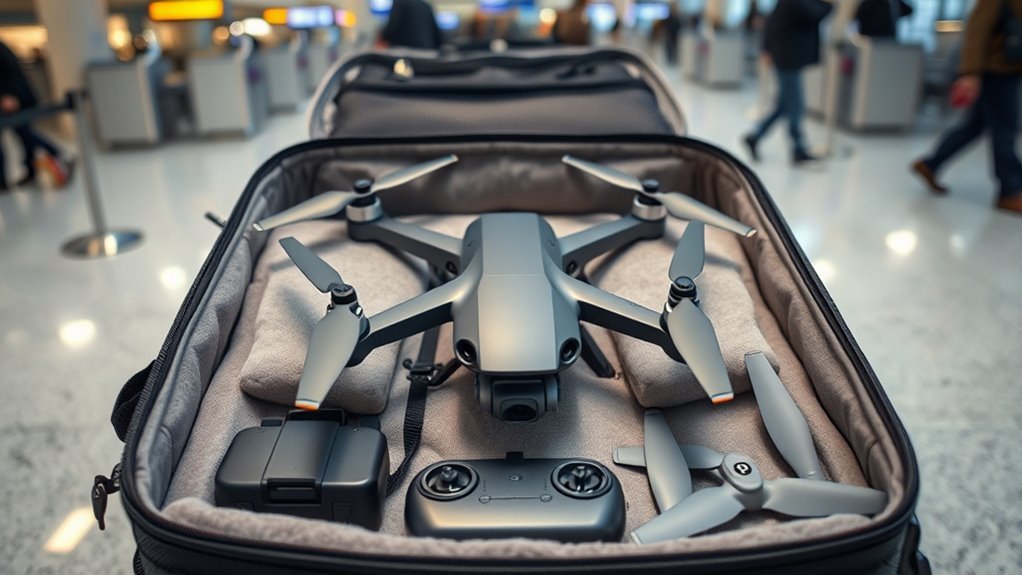
Under widely used civil aviation rules, lithium batteries in consumer devices are commonly permitted with constraints, typically including limits on watt-hours per battery and restrictions on spare batteries. While the exact thresholds can vary by airline and route, travelers should expect that spare batteries face stricter screening and must be protected from short circuits.
Fast way to check your battery compliance
Find the battery’s watt-hour rating on the label. If the label does not show Wh, you may need to compute it from the manufacturer’s voltage and capacity specifications.
- Protect terminals: Use tape or battery terminal caps to prevent short circuits.
- Prevent damage: Place batteries in individual protective cases or pouches.
- Follow “spare vs installed” rules: Some carriers restrict spare batteries more than batteries installed in the drone.
Registration and destination compliance can matter as much as airline policy
Your airline may allow the drone onboard, but you still must comply with drone registration and operating regulations where you land. Drone rules are not universal, and the consequences of noncompliance can include fines, seizure, or an inability to operate your drone.
For example, in the United States, the FAA has a well-known registration requirement for many drone operators, while the UK Civil Aviation Authority (CAA) applies its own operator registration framework. In the European Union, drone operation rules are influenced by EASA and national enforcement, including the “Open” category structure and operational limitations.
The key difference is that airline clearance is about transportation safety, whereas local aviation authority clearance is about lawful operation. Plan for both.
Plan your airport day to reduce delays during screening
Arriving early and preparing documentation helps your drone pass security smoothly. Airports and security officers use X-ray screening and sometimes require you to power down or demonstrate how the device is packed.
Airports can vary widely in screening procedures, but a consistent approach reduces friction: keep drone parts organized, follow battery packing rules, and be ready to answer questions about what you’re carrying.
What to do at security when you bring a drone
At the security checkpoint, you should expect additional scrutiny for batteries and electronics. Being proactive—rather than waiting until you’re at the front—usually improves the outcome.
- Arrive early: Give yourself extra time beyond your usual airport buffer.
- Keep batteries accessible: Do not bury batteries under soft items if you anticipate questions.
- Prevent accidental power-on: Ensure the drone cannot unintentionally turn on during screening.
- Follow staff instructions: If an officer asks you to remove a component or open packaging, comply promptly.
Conversational question: Will security make me take the drone out of the case? Often they will not, but it can happen if the X-ray image is unclear. A dedicated, well-padded case with organized compartments tends to reduce the chance of additional handling.
Travel documents that can help if you’re questioned
While rules vary, having supporting information can help if staff ask about compliance or battery specifications. Keep the documentation that proves the drone model and battery ratings.
- Battery label showing voltage and watt-hours (Wh)
- Order confirmation or product specification sheet for the drone and controller
- Where applicable, proof of operator registration (example: FAA registration confirmation in the United States)
How to prepare your drone for a safe flight
Proper preparation protects your drone from vibration, pressure changes, and impacts that can occur during handling. The most important preparation steps are mechanical safety, battery readiness for transport, and firmware stability.
X is defined as the combined set of actions that protect both performance and compliance during travel. In practice, that means your drone should be physically secured, electrically safe, and configured so it functions correctly after you land.
Pre-flight technical checks that matter after travel
Before you pack, perform a short checklist so you are not troubleshooting at your destination. This also reduces the chance that you’ll bring a damaged component onboard or fail quality gates during inspection.
- Inspect propellers: Check for cracks, chips, or bending that could worsen during transit.
- Verify mounts and screws: Tighten loose components to prevent rattling.
- Check the gimbal and camera: Make sure the gimbal is secured in its transport mode.
- Clean and dry: Remove dust and moisture, especially if you recently flew near salt water or rain.
Firmware updates: update carefully, not impulsively
Firmware consistency reduces connection errors and unexpected behavior after you arrive. The best time to update is when you have stable internet and time to test, not moments before boarding.
The key difference is that pre-travel firmware updates aim to improve reliability, while last-minute updates can create version mismatches with your controller or mobile device. If you update, test pairing and camera activation before packing.
Battery readiness for transport
Batteries should be packed according to the airline’s safety requirements, typically with terminals protected and batteries stored to prevent physical damage. Many travelers also follow manufacturer guidance for recommended storage state-of-charge.
Conversational question: Should I fully charge batteries before flying? There is no one-size-fits-all answer, but many manufacturers recommend avoiding long storage at 100% and following safe transport practices. The priority for compliance is terminal protection, secure packaging, and correct classification as installed vs spare.
Packaging and packing strategy for drones and controllers
Effective packing prevents crushing, protects fragile parts, and ensures batteries remain compliant during transit. A well-designed travel case can be the difference between a smooth arrival and a broken gimbal, bent propeller, or loose component.
Disassemble to reduce impact points and prevent damage
Disassembling is defined as removing or securing detachable parts to minimize stress during movement. You typically want to reduce the number of exposed, fragile components that can shift or break.
- Remove or fold landing gear extensions if your model supports it.
- Detach propellers if the drone design allows safe transport without requiring flight-ready configuration.
- Secure the gimbal with its dedicated lock or transport strap.
- Remove accessories that are likely to be damaged, such as light modules or landing pads.
Conversational question: Do I need to remove the battery for packing? For compliance and safety, follow airline rules. In many cases, batteries are treated as separate items (spare batteries) or stored properly when installed, but the exact requirement depends on airline policy and battery classification.
Use the right case and compartment organization
The most trusted travel packing method is using a case designed for your exact drone model or at least a case with custom foam inserts. Foam that prevents movement reduces internal impacts during loading and unloading.
Pack items so that heavy components do not press against delicate electronics. Consider separating the following into distinct compartments:
- Drone body and arms/landing gear
- Propellers (protected and separated from battery cases)
- Battery packs (terminal protected, ideally in individual sleeves)
- Controller and antennas
- Charging accessories and cables
- Memory cards and adapters in a small protected pouch
Accessories that often cause trouble if packed poorly
Certain accessories can increase the risk of short circuits, damage to connectors, or accidental activation. Packing them correctly reduces both security issues and hardware failures.
- Loose cables: Coil and secure; avoid exposing connector pins.
- Charging bricks: Place in protective sleeves and keep away from batteries.
- SD cards: Use a rigid holder to prevent bending or loss.
After arrival: inspection and operational readiness
Once you land, inspect your drone before your first flight to confirm that it survived handling. A quick check can prevent crashes caused by bent propellers, a shifted gimbal, or a loose connection.
Y is defined as the post-travel verification routine that focuses on safety and performance. Use it consistently so you avoid guessing and reduce the chance of operating a damaged aircraft.
Post-flight checklist you can complete in minutes
- Check propellers for chips or deformation.
- Confirm gimbal moves freely and centers correctly.
- Inspect battery contacts and ensure the battery is undamaged.
- Power on and verify controller connection stability.
- Perform a short compass/motor check if required by your drone’s app workflow.
Know local airspace rules before you fly
Even if you successfully transport the drone, you still must comply with local airspace restrictions and registration/authorization rules. This is especially important near airports, stadiums, government facilities, and crowded public events.
Common expert guidance across many civil aviation authorities is to check official airspace resources, follow altitude and distance limits, and avoid restricted zones. If your destination requires permits or authorization for certain locations, secure them before your flight day.
Quick FAQ for travelers
- Can I bring a drone on a plane in the cabin? Often yes, if your airline allows it and you pack batteries correctly, but you must confirm carrier-specific rules.
- Are lithium batteries allowed? They are commonly allowed under strict conditions, including watt-hour limits, terminal protection, and correct handling of spare batteries.
- Do I need to register my drone before travel? Registration requirements depend on the destination country and operator status; verify rules with the local aviation authority.
- What should I do if my drone is damaged in transit? Document the damage immediately, stop further powering, and follow the airline’s and manufacturer’s recommended next steps for inspection and warranty or claim processes.
Best-practice checklist to ensure you’re fully prepared
A reliable travel workflow reduces stress and prevents last-minute refusals at check-in or security. Use this checklist to confirm compliance, protect equipment, and stay ready to fly lawfully at your destination.
- Verify airline policy: Check carry-on vs checked rules for your drone model and batteries.
- Confirm battery watt-hours: Protect terminals and pack batteries to prevent short circuits.
- Secure the drone: Disassemble detachable parts, lock gimbals, and use a custom or foam-lined case.
- Update thoughtfully: Ensure firmware and controller pairing work before departure.
- Arrive early: Plan extra time for security screening and potential battery questions.
- Inspect on arrival: Check props, gimbal, battery contacts, and controller connection.
- Confirm destination rules: Verify registration and airspace authorization requirements before operating.
If you follow these guidelines, you align your trip with commonly accepted aviation safety expectations and local drone compliance requirements, improving both the travel experience and your readiness to fly responsibly.
📋 About This Article
This article explains the key rules you need to follow to bring a drone on a plane without surprises. It’s for travelers who want to pack and carry their drone confidently, whether they’re using carry-on or checked bags. You’ll learn how to verify your airline’s drone rules, how lithium battery limits affect what you can bring in the cabin, and what to do with packaging and storage to stay within common safety standards.
Frequently Asked Questions
Can I bring a drone on a plane?
How should I pack my drone for air travel?
Where should I put the drone batteries—carry-on or checked baggage?
Are there limits on the size or watt-hours of drone batteries?
Do I need to declare my drone or register it for international travel?
References
- Google Scholar: Drone Transport and Airline Policy Research Search Google Scholar
https://scholar.google.com/scholar?q=drone+transport+airline+policy+rules - Google Scholar: Unmanned Aerial Systems Aviation Regulation and Passenger Guidance Search Google Scholar
https://scholar.google.com/scholar?q=unmanned+aerial+systems+aviation+regulation+passengers - FAA UAS Overview (Rules and Guidance for Drones)
https://www.faa.gov/uas - TSA Guidance on Bringing Drones Through Security
https://www.tsa.gov/travel/security-screening/what to bring/prohibited-items/drones - CDC Malaria Home (for health travel references)
https://www.cdc.gov/malaria/index.html - WHO Fact Sheets (authoritative health guidance for travel context)
https://www.who.int/news-room/fact-sheets - Encyclopaedia Britannica Overview of Drones
https://www.britannica.com/technology/drone
📅 Last Updated: July 03, 2026 | Topic: Essential Guidelines for You to Bring Drones on a Plane | Content verified for accuracy and freshness.
