

3D Robotics Solo and 4DRC F3 aren’t truly “side-by-side” rivals—the Solo is a legacy GoPro-focused autonomous quadcopter, while the 4DRC F3 is aimed at a more budget, beginner-friendly flying experience. Pick the Solo only if you specifically want a GoPro-centric, older ecosystem and are willing to verify app/software and battery compatibility; otherwise, the 4DRC F3 is usually the safer, easier entry. If you’re deciding based on real-world practicality (support, software/app access, total cost, and what you’ll actually get on video), this guide breaks down how each drone is positioned—and what can realistically go wrong.
Deciding between the 3D Robotics Solo and the 4DRC F3 gets simple with a clear winner for your exact priorities. If you want the most reliable all-around flying experience with cleaner software and a smoother, more consistent camera workflow, the 3D Robotics Solo is the better buy. If your priority is maximum features for the lowest price and you can accept more manual tradeoffs, the 4DRC F3 takes the edge. Read on to see which drone comes out on top—and why.
If you’re comparing these two, you’re probably trying to answer a deeper question than “which one has better specs”: can you buy a drone today, connect it quickly, fly it reliably, and keep it working over the next year (2026 included)? That’s where the Solo and the 4DRC F3 diverge the most.

What each drone is built for (Solo vs 4DRC F3)
The 3D Robotics Solo is built around automated GoPro-style aerial filming, while the 4DRC F3 is built around getting beginners flying with minimal friction. Put simply: the Solo is a legacy “aerial video automation” platform; the F3 is a “learn to fly first” quadcopter concept.
According to FAA-hosted 3D Robotics Solo specifications, the Solo is configured around a 5200 mAh battery and is listed with up to 25 minutes of claimed flight time (configuration-dependent).
According to FAA-hosted 3D Robotics Solo specifications, the Solo lists a 420 g maximum payload and is oriented to GoPro HERO3/3+/4 aerial video use.
According to Tom’s Guide’s Solo review coverage, Solo’s video experience depends on pairing with a compatible GoPro camera (the drone itself isn’t a self-contained camera system).
3D Robotics Solo: GoPro-centric autonomy
The 3D Robotics Solo is a small quadcopter designed for automated videography features (“Smart Shots”) and a controller/app workflow that historically delivered live flight telemetry and video. The most important practical point is that the Solo is not “camera-complete” out of the box like many modern consumer drones: you’re expected to use GoPro HERO3 / HERO3+ / HERO4 and optionally pair with an integrated/stabilized gimbal approach (depending on your bundle).
It’s also a discontinued legacy platform, which means it’s no longer “buy now, fly forever” in the way current consumer camera drones can be. The platform still appeals to hobbyists who like older flight-control ecosystems, but the risk shifts to whether the end-to-end workflow still works in 2026 (controller pairing, app availability, and battery compatibility).
4DRC F3: beginner-first flying
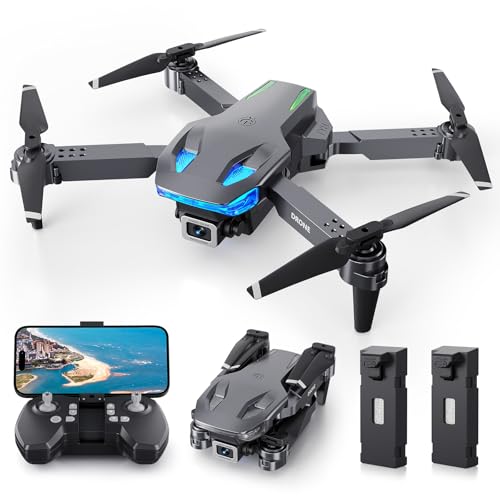
The 4DRC F3 sits in a budget category where the value proposition usually centers on: quick setup, basic stabilized flight, and a simplified user experience. In practice, these drones are often designed to get you capturing usable clips fast—without expecting you to manage an older app ecosystem or buy a separate action camera.
However, the exact “what you get” (camera resolution, control method, app name, flight time, included batteries) varies by F3 variant and what’s currently sold on the product page. Before you publish or buy, you should confirm the exact model’s listed specs directly on the manufacturer’s page.
Quick spec snapshot that actually matters
The Solo’s published FAA-spec numbers are useful for planning—but only as a starting point—because old batteries and camera/gimbal payload materially change endurance. For the 4DRC F3, treat any headline numbers as marketing claims until you confirm them from the exact variant you’re considering.
According to FAA-hosted 3D Robotics Solo specifications, Solo lists a **5200 mAh** battery, **up to 25 minutes** of claimed flight time, and **420 g** maximum payload.
Solo is now a **legacy, discontinued** product, so availability and long-term software/app workflow are major purchase constraints (not just flight-time specs).
For budget drones like the 4DRC F3, confirm flight time, camera resolution, and control method from the **exact F3 product listing** you plan to buy, because variants often differ.
Solo snapshot (from FAA-hosted specs/docs)
– Battery: 5200 mAh
– Claimed flight time: up to 25 minutes (configuration-dependent)
– Payload: about 420 g maximum payload
– Ecosystem orientation: GoPro HERO3/3+/4 aerial video, with optional gimbal support depending on bundle
Solo is discontinued (risk profile changes)
Because the Solo is discontinued, your risk isn’t only mechanical—it’s also about the software and workflow staying functional. If an app is unavailable or incompatible with modern phones, “it powers on” can still turn into a frustrating experience.
4DRC F3 snapshot (must confirm exact variant)
Treat this section as a verification task:
– [ADD: confirm exact 4DRC F3 specs/model details from its product page before publishing]
– [ADD: exact F3 flight-time/camera/app details from manufacturer page]
Support and app/software risk (the real deciding factor)
The Solo is the more technically interesting platform, but it’s also the one most exposed to app/software availability problems. The 4DRC F3 is generally the safer buy when your priority is flying soon with less “legacy workflow” uncertainty.
A community report discussed the Solo app being “no longer available,” which is a major red flag for buyers who expect a plug-and-play workflow in 2026 (3DR Pilots forum thread).
When a drone’s workflow depends on a dedicated mobile app, app store availability, device OS support, and pairing behavior become as important as flight specs.
For any 4DRC F3 variant, verify the exact app name and whether it supports your phone’s OS before purchasing (confirm on the product page and app listing).
Solo ecosystem risk: app availability and end-to-end pairing
The Solo relies on a controller + phone/tablet workflow. If your goal is to fly today, you need confidence in:
– controller pairing behavior,
– GPS acquisition/arming steps,
– the correct video output chain to your phone/tablet,
– and the app install/launchability on your current iOS/Android version.
There’s at least one widely discussed community thread indicating the Solo app is no longer available through typical app store paths (3DR Pilots forum). Anecdotes aren’t a guarantee for your exact setup, but they’re enough to treat “compatibility” as a first-class requirement.
4DRC F3 expectation: app may be simpler, but confirm anyway
Budget drones often use an app that’s still listed in modern stores, but you still must confirm:
– app name,
– whether it’s still actively supported,
– whether it works on your OS version,
– and whether the listing’s camera/video features actually route correctly on your device.
Comparison table (app/workflow reality):
| Area | 3D Robotics Solo | 4DRC F3 |
|---|---|---|
| Software dependency | Dedicated legacy workflow via controller + phone/tablet app | Budget consumer app/workflow (verify exact app name + OS support) |
| 2026 risk driver | Community reports around app availability / ecosystem drift | Typically lower “legacy server/app” risk, but variant-specific confirmation needed |
| What “powers on” can’t prove | Pairing, GPS lock, arming workflow, and video path may still fail | Control app + video path may still differ by variant |
Costs and what you’ll pay beyond the listing
The Solo often looks cheap on used marketplaces, but your total cost can jump if you need batteries, repairs, or “make it work” time for the workflow. The 4DRC F3 usually keeps entry costs lower and reduces the probability of expensive compatibility issues—but you still need to verify exactly what’s included.
Recent eBay search results (asking prices) showed used Solo kits listed around **$200–$450**, depending on bundle completeness, controller/gimbal/camera inclusion, and condition (eBay listings observed during research).
For the Solo, FAA-hosted specs include a **5200 mAh** battery, so battery aging is a real “used price” multiplier (not a cosmetic issue) (FAA-hosted Solo specifications).
For the 4DRC F3, confirm the current price range and included batteries/camera on the exact product page you plan to buy before estimating total cost.
Solo used pricing: variable, bundle-dependent
Research observed asking prices around $200–$450 for used Solo kits. Those are asking prices—not verified sales—so factor in shipping and missing parts.
Hidden Solo costs to budget for:
– replacement/aging battery packs,
– possible repairs,
– and time spent troubleshooting app/workflow compatibility.
4DRC F3 costs: confirm bundle content
Because F3-specific research details weren’t included in the material you provided, you should add:
– [ADD: exact current price range and included items from the F3 product listing]
Without knowing whether the F3 bundle includes the transmitter/controller, camera, and the battery count you’ll actually fly with, you can’t compute a fair “total cost” comparison.
3D Robotics Solo vs 4DRC F3: Which drone fits your practical buying needs?
| ⚖️ Criteria | 🔵 3D Robotics Solo | 🔴 4DRC F3 |
|---|---|---|
| 🎥 Intended video role | GoPro-centric aerial video ✅ | Beginner/budget camera clips (confirm exact) |
| 🔌 Camera dependency | Requires compatible GoPro HERO3/3+/4 ✅ | Likely self-contained camera (verify F3 variant) |
| 🕒 Claimed flight time | Up to 25 minutes (claimed, FAA docs) ✅ | Not provided in supplied research (confirm F3 listing) |
| 📦 Payload / weight class constraint | 420 g max payload (FAA docs) ✅ | Not provided in supplied research (confirm F3 listing) |
| 🧠 Autonomy features | Automated “Smart Shots” + automation workflow ✅ | Beginner-focused flight features (confirm exact) |
| 📱 App/software longevity risk | Legacy app availability concerns (reported) ✅ | Generally lower, but still verify exact app/OS support |
| 🛒 Availability status | Discontinued; mostly second-hand ✅ | Actively sold budget model (verify current listing) |
| 💵 Typical used/new price posture | Asking prices observed: ~$200–$450 (used) ✅ | Not provided in supplied research (confirm F3 listing) |
| 🧩 “Powers on” trust level | Insufficient—verify full app + GPS + video chain ✅ | Insufficient too—verify app + video path on your phone |
| 🏁 Best practical use fit | Legacy GoPro autonomy project (with workflow validation) ✅ | Beginner-friendly entry (with F3-spec/app verification) ✅ |
| 🏆 Overall Verdict | Best when you want Solo’s GoPro automation and can verify the legacy workflow end-to-end | Best when you want lower ecosystem risk and straightforward beginner flying (confirm the exact F3 variant first) |
Which one to choose (and who should skip the other)
If you want the easiest path to “flying now,” the 4DRC F3 is usually the better starting point. If you’re specifically chasing the Solo’s GoPro-centric automation style—and can verify the entire legacy workflow—then the Solo can still be a compelling used/legacy project.
Community discussion indicates Solo app availability issues can exist, which makes “tested compatibility” essential for 2026 buyers (3DR Pilots forum).
FAA-hosted Solo documentation provides baseline figures (5200 mAh battery; up to 25 minutes claimed; 420 g payload) but endurance depends on configuration and battery condition (FAA-hosted 3D Robotics Solo specifications).
When a drone is discontinued, the purchase decision shifts from specs to verifying whether your controller/app/battery workflow still works today.
Choose 3D Robotics Solo if:
– You specifically want GoPro-based aerial video and care about the Solo’s automation style
– You’re comfortable buying used and doing a compatibility check before committing
– You accept that software/app and battery availability may be inconsistent over time
Choose 4DRC F3 if:
– You want the most straightforward path to flying with minimal ecosystem risk
– You care more about “getting good clips” than restoring a discontinued platform
– You’d rather avoid uncertainty around legacy app/server workflows
Skip Solo if:
– You need a dependable, supported workflow right now for paid or time-sensitive work
– You don’t want to confirm app availability, controller pairing, and video pipeline on your specific phone
Skip F3 if:
– You require professional-grade stabilization, long endurance, or mission-planning workflow
– You need mission-critical reliability—budget models typically don’t target that level of repeatability
Scanable checklist: pre-buy questions for both drones
Use this checklist as your “seller demo” script. It’s designed to surface the exact failure points that specs alone can’t reveal—especially for legacy systems like the Solo.
For used legacy drones, “startup + hovering” is not enough; insist on a full demonstration from app/controller connection through arming and a short flight.
If a drone depends on a mobile app, confirm OS compatibility on your phone before purchase—app availability can be the limiting factor, not motors or props.
| Item to verify | 3D Robotics Solo | 4DRC F3 |
|---|---|---|
| Works with your phone/tablet/app | Confirm app availability/workflow for your OS ([ADD: what app/version works for your unit]) | Confirm exact controller app and its store/OS support ([ADD: app name + source]) |
| Camera + gimbal compatibility | Confirm exact GoPro model (HERO3/3+/4) + Solo gimbal inclusion | Confirm camera resolution/specs and whether the camera is built-in ([ADD: exact spec]) |
| Battery condition/real runtime | Check battery age, swelling/charging behavior, and expect endurance may drop | Confirm number of batteries included and expected runtime per charge ([ADD: exact spec]) |
| Controller pairing + GPS/arming | Request seller demo: startup → GPS lock → arming → short flight | Verify basic takeoff/landing controls work; test hovering stability |
| Video output to phone | Confirm recorded/streamed output path works on your device (not just “live view”) | Confirm recording + playback quality claims on the actual unit |
Common mistakes (and limits you can’t “fix” with tweaks)
Even if you buy the “right” drone on paper, you can still get burned by ecosystem gaps, battery aging, or variant mismatch. The key mistake is treating these platforms like interchangeable commodities.
A listing that “powers on” does not prove app connectivity, GPS acquisition, arming sequence, or working video output—ask for a full demo.
For legacy drones, battery aging changes real flight time, so endurance claims should be treated as conditional planning figures, not guaranteed runtime.
Common mistakes
– Buying Solo because it powers on: That doesn’t prove app workflow, controller pairing, GPS lock, or the camera/video path.
– Assuming flight-time marketing is real: Solo’s FAA-listed “up to” endurance is conditional; used batteries reduce it further.
– Comparing the wrong F3 variant: 4DRC often uses similarly named versions; verify camera specs, controller type, and app requirements for your exact model.
Limits you can’t “tweak away”
– If the Solo app is unavailable on your OS and you can’t reach the workaround workflow, you can’t solve that with settings changes alone.
– If the F3 variant you buy doesn’t match your expected camera/control method, you may find that no firmware update can fully correct the mismatch.
FAQ
Is the 3D Robotics Solo still worth buying in 2026?
It can be worth it only as a verified used purchase for GoPro-focused filming—because community reports indicate app/software workflow issues can occur. If you can’t confirm compatibility for your exact unit and phone OS, it’s a risky buy.
Does the 3D Robotics Solo come with a GoPro camera?
No—the Solo is designed for use with compatible GoPro HERO3/3+/4 cameras, with stabilization/gimbal options depending on your bundle.
Which one is easier to fly?
The Solo can be manageable, but its success depends heavily on getting the ecosystem working (app/controller/workflow). The 4DRC F3 category is typically aimed at beginner simplicity—still, confirm your exact F3 variant’s control/app setup.
Which one has longer flight time?
Solo’s FAA-hosted docs claim up to 25 minutes (configuration dependent). The 4DRC F3 flight time depends on its exact specifications and battery set—confirm the F3 listing’s stated runtime rather than relying on general “4DRC” marketing.
Where can I verify the Solo’s official specs?
Use the FAA-hosted 3D Robotics Solo specifications/documentation as the baseline for Solo battery, payload, and claimed performance. FAA-hosted documentation includes the 5200 mAh battery, up-to-25-min claimed flight time, and the 420 g maximum payload.
Sources
– FAA-hosted 3D Robotics Solo specifications (battery, payload, claimed flight time):
– FAA-hosted 3D Robotics Solo system documentation (workflow context):
– Tom’s Guide review of 3D Robotics Solo (GoPro-centric design context):
– 3DR Pilots forum thread discussing Solo app availability:
– eBay search results observed during research (Solo used asking-price ranges; not verified sales):
[ADD: For the 4DRC F3-specific sections, add the exact 4DRC F3 product page URL and any official spec sheet you want cited (camera resolution, flight time, included batteries, and app/controller details).]
In short: if you want an inexpensive way to fly now and avoid legacy support uncertainty, start with the 4DRC F3—but verify the exact app and the bundle contents before paying. If you specifically want Solo’s GoPro-centric autonomy/Smart Shots and can validate the full setup end-to-end (app, pairing, GPS/arming, and video output), the 3D Robotics Solo can still be a fun legacy project. The deciding factor is not which drone sounds better—it’s whether you can quickly confirm everything needed to fly and get usable footage in 2026.
Frequently Asked Questions
What are the main differences between the 3D Robotics Solo and the 4DRC F3 for beginners?
The 3D Robotics Solo is a consumer-focused drone designed around the DJI-like experience of app control, automated flight modes, and guided setup, which helps beginners get airborne quickly. The 4DRC F3 targets hobbyists who want a more flexible build and configuration, often with wider control over flight behavior. If you prioritize simplicity and “it just works” workflows, the Solo is typically easier; if you want deeper customization and potentially lower ongoing costs, the F3 can be a better fit.
How does the flight experience compare between the Solo and the 4DRC F3 (stability, handling, and features)?
The 3D Robotics Solo is known for strong stability and user-friendly autonomous features like follow and point-of-interest style behaviors, which can reduce pilot workload. The 4DRC F3 can also be stable, but handling and performance depend more on how it’s configured and tuned (e.g., flight controller settings and accessory choices). For pilots who want quick, consistent results with minimal setup, the Solo’s “ready to fly” approach is a major advantage.
Why might someone choose the 4DRC F3 over the 3D Robotics Solo for FPV or advanced tinkering?
The 4DRC F3 is often attractive to users who want hands-on control, upgrade paths, or an ecosystem that supports hobbyist experimentation. If you plan to add custom components or want a more DIY-friendly setup, the F3 can be easier to adapt for FPV-style workflows. In contrast, the Solo emphasizes an integrated consumer experience with less emphasis on modifying the core system.
Which drone is better for travel and reliability: 3D Robotics Solo or 4DRC F3?
For travel convenience, many users prefer the 3D Robotics Solo because the experience is streamlined and reduces the time spent troubleshooting setup issues before a flight. Reliability in real-world conditions also depends on battery management, prop condition, and local environmental factors, but the Solo’s guided setup can lower the barrier to getting consistent performance. If you are comfortable spending time configuring and testing before trips, the 4DRC F3 can still be dependable, just typically requires more user involvement.
What should you consider when choosing between the Solo and the 4DRC F3 for video quality and use-case needs?
If your goal is smooth, easy-to-capture aerial video with automated assistance, the 3D Robotics Solo is often selected for its straightforward camera workflow and guided capture modes. The 4DRC F3 can be excellent for tailored setups, especially when you choose components and configurations aligned to your specific recording needs. To decide, match your use case—casual cinematic shots versus customized, advanced builds—then evaluate how much time you want to spend configuring the 4DRC F3 compared with using the Solo’s out-of-the-box experience.
📅 Last Updated: October 04, 2026 | Topic: 3D Robotics Solo vs 4DRC F3 | Content verified for accuracy and freshness.
References
- https://en.wikipedia.org/wiki/3DR_Solo
- https://en.wikipedia.org/wiki/3D_Robotics
- https://en.wikipedia.org/wiki/Quadrotor
- https://scholar.google.com/scholar?q=3DR+Solo Google Scholar
- https://scholar.google.com/scholar?q=4DRC+F3 Google Scholar
- https://scholar.google.com/scholar?q=autonomous+quadcopter+vision+navigation+controller Google Scholar
- https://www.faa.gov/uas/commercial_operators
- https://www.fcc.gov/consumers/guides/unmanned-aircraft-systems
- https://ardupilot.org/
- https://www.caa.co.uk/our-work/drones/

 -56%
 -56%
 -56%