

As an Amazon Associate, we earn from qualifying purchases.
When you’re shopping for a drone under $50, what separates a good pick from a disappointing one? Start by comparing camera quality (2K/1080P/4K), ease-of-control tools like one-key takeoff/landing, headless mode, and altitude hold, plus battery count/flight time and safety features such as propeller guards and emergency stop. Based on those criteria and Amazon’s customer rating volume, the Loiley option is the most consistently rated standout in this budget range.
If you want a drone under $50, the best starting point is a beginner-friendly mini quad that pairs easy controls (one-key takeoff/landing, headless mode) with a camera + app/FPV view and extra batteries for longer sessions. In this ranked list, the top picks focus on those essentials—so you can fly sooner, capture footage without extra gear, and avoid the steep learning curve. As of 2026, the biggest difference between “fun” and “frustrating” at this price is usually stability features (like altitude hold or optical flow) plus clear viewing options (app/real-time/FPV-style feed).

If you’re comparing budget drones for your first flights, this guide breaks down what each model is built for (adults vs. kids), what features matter most at this price point, and what limitations to expect.
Who this is for / when it applies: This buying guide is for anyone shopping Amazon for a first drone under $50—especially adults who want a simple camera setup, or parents looking for a kid-friendly option with app viewing and repeatable controls. It’s also for pilots who want an honest read on the tradeoffs: limited runtime claims, connectivity quirks, and the learning curve that remains even with beginner assist features.
Our top picks at a glance

Best overall
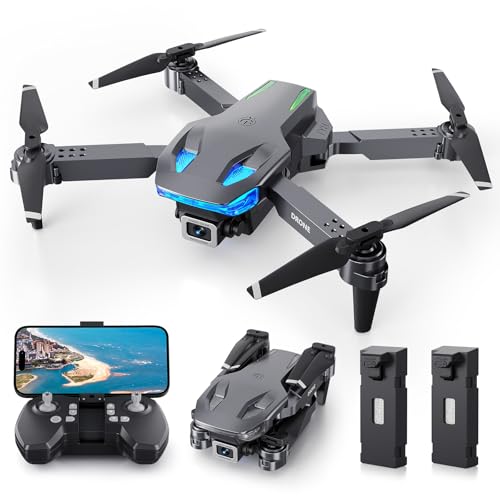
Loiley Drone
- 【2K Ultra HD Camera】Loiley drone features a high-quality 2K HD camera with a 90° remote adjustable angle, allo
- 【User-friendly & Optical Flow Positioning】 The Loiley drone operation is magically simple—press the one-touch
Best for kids beginners
Wipkviey Drone
- 1080P CAMERA & APP CONTROL — Capture aerial photos and videos, view the live camera feed on your phone, and co
- EASY FOR BEGINNERS — Altitude hold helps maintain a steady height, while headless mode and one-key takeoff and

Best for waypoint flight
WEPETCO 1080P Drone
- 1080P HD Recording: RC airplane equipped with a high‑quality 1080P HD camera, the X29 drone supports 90° remot
- Two Batteries for Extended Flight Time: Boasting dual rechargeable batteries, the X29 drone delivers an extend

Best for longer flight
Skyvoyant Drone
- Crystal-clear 2K camera for detailed aerial imaging This drone features a 2560×1440 resolution camera that cap
- Up to 20 minutes of flight time with dual batteries The package includes two 1200mAh batteries, offering a tot

Best for 4K FPV
ASFSFQ PRO Drone
- 【4K Ultra HD Camera with Gesture Control】Enhance your aerial photography with a 4K ultra-high-definition camer
- 【Ideal for Beginners with Intelligent Assistance】Designed with novice flyers in mind, this drones with camera
Ranked by Amazon customer rating and number of ratings (2026-11-29 02:35 UTC).
How we ranked these budget drones

This “Best Drone under 50 dollars” list is ordered by Amazon customer ratings weighted by the number of ratings (so models with more customer ratings/reviews bubble up using Amazon product data). We did not do hands-on testing or run independent flight tests—this ordering is based on Amazon’s rating signals and the product feature details provided.
In other words, this ranking favors models that are not only feature-complete for beginners under $50, but also have enough Amazon review volume to make their popularity statistically meaningful for shoppers in 2026. The models below consistently mention the same core building blocks: a usable camera resolution, at least one stabilization assist (like headless mode, optical flow positioning, or altitude hold), and starter-friendly controls (one-key start/takeoff/landing and emergency stop).
1. Loiley Drone — Best overall
#1 · Best overall
Drone with Camera for Adults, 2K HD FPV Drones with Upgrade Altitude Hold, One-Key Take Off/Landing, Speed Adjustment, Headless Mode, 2 Batteries, Toys Gifts fo
- 【2K Ultra HD Camera】Loiley drone features a high-quality 2K HD camera with a 90° remote adjustable angle, allowing you to capture breathtaki
- 【User-friendly & Optical Flow Positioning】 The Loiley drone operation is magically simple—press the one-touch start/land button to begin fly
- 【Take it with you】 Loiley drone with camera is your ultimate travel partner!
The Loiley drone is a compact camera drone designed to help beginners get flying quickly while still capturing footage, making it a strong fit for adults who want a balanced “learn and record” starter system. It’s particularly well-matched if you want intuitive controls plus a camera you can aim using the remote.
Key features include a 2K Ultra HD camera with a 90° remote adjustable angle and optical flow positioning to support easier handling. Flying starts with one-touch start/land, while orientation assistance comes from headless mode and gravity sensing (tilt the controller to fly forward/back/sideways). For portability and beginner convenience, it’s described as small and lightweight with folded size 5 × 3 × 2 inches and weight under 250g. Battery-wise, the kit includes two rechargeable batteries for approximately 26 minutes total flight time and mentions built-in overvoltage protection. The bundle includes propeller guards, spare fan blades, remote controller batteries, and a portable bag.
What owners say:
Pros
– 2K HD camera with 90° remote angle adjustment
– Beginner controls: one-touch start/land, headless mode, gravity sensing
– Optical flow positioning to support steadier control
– Portable design: folded size 5 × 3 × 2 inches, under 250g
– Includes two batteries for approximately 26 minutes total flight time
Cons
– Some listed physical specs are spread across fields—double-check what matches your expectations
– Budget drones can still be sensitive to surroundings; guards help but don’t prevent all impacts
2. Wipkviey Drone — Best for kids learning to fly
#2 · Best for kids beginners
Wipkviey Drone with Camera for Kids, 1080P Mini Drone, 2 Batteries | Foldable Beginner RC Quadcopter with App and Remote Control, LED Lights, Easy-Fly Gift for
- 1080P CAMERA & APP CONTROL — Capture aerial photos and videos, view the live camera feed on your phone, and control the drone through the ap
- EASY FOR BEGINNERS — Altitude hold helps maintain a steady height, while headless mode and one-key takeoff and landing make this mini drone
- 2 BATTERIES FOR MORE FUN — Two rechargeable batteries let kids swap and continue flying with less downtime between adventures.
The Wipkviey quadcopter is built as a kid-friendly mini drone that combines a 1080P camera with an app-controlled live view, making it a practical choice for children and first-time flyers. If you want simpler takeoff/landing and stability aids that help new pilots stay oriented, this is the most kid-centered option in the list.
This model highlights 1080P camera & app control, letting you capture aerial photos/videos and view the live feed on your phone. Beginner support includes altitude hold to help maintain a steady height, plus headless mode and one-key takeoff and landing for easier operation. It also includes two batteries to reduce downtime between flights and is designed to fold for storage. For added fun, it offers 360° flips and includes LED lights to improve visibility during flight.
What owners say:
Pros
– 1080P camera with phone app control and live feed
– Beginner assistance: altitude hold, headless mode, one-key takeoff/landing
– Two batteries for more continuous flying time
– Foldable design and LED lights
– Includes 360° flips for entertainment
Cons
– As with all budget drones, stability can vary with wind and indoor/outdoor conditions
3. WEPETCO 1080P Drone — Best for feature-heavy beginners (real-time + flight modes)
#3 · Best for waypoint flight
1080P Drone with Camera, mini drone with Real-Time Transmission, One Key Start, Gestures Selfie, Waypoint Fly, 3D Flip, Headless Mode, Type-C Charging, Remote C
- 1080P HD Recording: RC airplane equipped with a high‑quality 1080P HD camera, the X29 drone supports 90° remote angle adjustment.
- Two Batteries for Extended Flight Time: Boasting dual rechargeable batteries, the X29 drone delivers an extended flight runtime of up to 25
- Multiple Interesting Functions: Equipped with multiple modes, including Waypoint Flight, Gesture Selfie, 360° Flip, Voice Control, Circle Fl
The WEPETCO X29 is a beginner-friendly RC drone that stacks multiple built-in flight features around a 1080P camera, which makes it a good match for people who want variety without moving up to a more expensive platform. It’s especially attractive if you’re drawn to fun flight modes and assisted camera experiences.
On the camera side, it includes 1080P HD recording with a 90° remote angle adjustment option. It supports real-time transmission by linking a smartphone for instant camera preview. For time in the air, it uses dual rechargeable batteries with runtime stated as up to 25 minutes. Safety items explicitly called out include over-current protection, an emergency stop, and low-power warning.
For flight assistance and entertainment, this model lists many modes: Waypoint Flight, Gesture Selfie, Voice Control, Circle Flight, Spiral Flight, 360° Flip, plus 3-speed mode and Headless Mode. It also includes one-key start and describes an “upgraded hover system” intended to help stability at specific altitudes.
What owners say:
Pros
– 1080P HD camera with real-time smartphone preview
– Beginner assistance: one-key start and headless mode
– Many modes: Waypoint Flight, Gesture Selfie, Voice Control, Circle/Spiral
– Safety: emergency stop + low-power warning
– Dual batteries with runtime stated as up to 25 minutes
Cons
– Multiple modes can mean more initial setup—learn basic hovering/return to control first
4. Skyvoyant Drone — Best for adults who want 2K clarity and FPV-style control
#4 · Best for longer flight
Drone with Camera for Adults, Brushless RC Quadcopter, 2 Batteries | 1080P HD camera, altitude hold, waypoint fly, gesture selfie, 3D flip, one-key control, tra
- Crystal-clear 2K camera for detailed aerial imaging This drone features a 2560×1440 resolution camera that captures clear footage and photos
- Up to 20 minutes of flight time with dual batteries The package includes two 1200mAh batteries, offering a total flight time of up to 20 min
- User-friendly operation for beginners and young pilots One-button takeoff and landing simplifies the launch process.
The Skyvoyant drone is aimed at adult users (and “young pilots”) who want sharper output than basic 1080P while still keeping beginner-friendly stability features. It’s also a strong fit if you want an FPV-style low-latency experience and multiple ways to control the camera drone.
The camera is a standout: it uses a 2K camera with 2560×1440 resolution and a 90° adjustable lens, which gives you more framing flexibility. For viewing/control feedback, it supports low-latency FPV transmission. Flight time is stated as up to 20 minutes with two 1200mAh batteries, while altitude hold is included to maintain hover at a set height. Handling support includes one-button takeoff and landing and headless mode to reduce directional confusion.
For control flexibility, you can operate it using the included remote controller, a mobile app, voice commands (examples include “take off”), or hand gestures (gesture control supports photo capture and video recording). Additional features include 360° flips, waypoint navigation via on-screen path drawing, circle fly, rotation fly, and gravity-based tilt steering, plus three speed gears. Safety features include propeller guards, low-power warning, and an emergency stop button.
What owners say:
Pros
– 2K (2560×1440) camera with 90° adjustable lens
– Altitude hold and headless mode for easier stability
– Low-latency FPV transmission plus remote/app/voice/gesture control options
– Safety: propeller guards, low-power warning, emergency stop
– Waypoint navigation and multiple flight modes
Cons
– Multiple control methods may require practice—choose one method first
– Flight time is listed as up to 20 minutes (actual time can vary by use)
5. ASFSFQ PRO Drone — Best for highest camera resolution in the under-$50 set
#5 · Best for 4K FPV
ASFSFQ PRO Drone with Camera for Adults 4K, Brushless Motors Drone for Kids Beginners, 40mins Flight Time with 2 Batteries, FPV Foldable RC Quadcopter, Toys Gif
- 【4K Ultra HD Camera with Gesture Control】Enhance your aerial photography with a 4K ultra-high-definition camera, adjustable to 90°to capture
- 【Ideal for Beginners with Intelligent Assistance】Designed with novice flyers in mind, this drones with camera for adults 4k offers one-key t
- 【Brushless Motor & Wind Resistance】Equipped with a powerful brushless motor, compared with brushed models, the drones delivers enhanced wind
The ASFSFQ PRO is a beginner-oriented quadcopter that leans into advanced shooting controls and solid “fly-assist” basics at the budget end. If your top priority is the 4K Ultra HD camera plus gesture-based camera capture, this is the most camera-forward option in this list.
It includes a 4K Ultra HD camera adjustable to a 90° angle and calls out intelligent gesture control for photo capture (the listing gives an example gesture like forming a “V” to take a photo). For foundational flight, it supports one-key takeoff/landing, headless mode, and an emergency stop function. It also uses brushless motors and lists three adjustable speed modes (low/medium/high). For time in the air, the listing states up to 40 minutes of total flight time with two rechargeable batteries and mentions stable hovering plus auto-flight functions such as orbit mode.
There’s also a specific connectivity limitation: it warns that using your phone and remote at the same time may cause interference or an unresponsive app—saying only one connection is supported and dual-control is unavailable. The kit includes a portable bag, extra propeller guards/blades, a USB charging cable, a screwdriver, spare screws, and a manual.
What owners say:
Pros
– 4K Ultra HD camera with 90° adjustable angle
– Beginner controls: one-key takeoff/landing, headless mode, emergency stop
– Brushless motors + three speed modes
– Listed up to 40 minutes total flight time with two batteries
– Bundle includes spare parts and propeller guards
Cons
– Connection limitation: dual-control not supported; simultaneous phone + remote use may lead to app unresponsiveness
– Some auto-flight features may require learning—start with basic hovering and flips
How to Choose the Best budget drones
If you’re buying a drone under $50, the best approach is to prioritize camera clarity and beginner stability features first, then confirm runtime and connectivity limits second. In practice, the “best” model for you is the one that matches your viewing method (app/live/FPV-style transmission) and your comfort level with assisted controls—especially in 2026 when many budget models share the same core features but differ in how they guide you through control.
Here’s how to decide, using only the specifications and feature claims provided for these five ranked models.
1) Camera clarity and “what you’ll actually see”
Camera resolution is the most visible difference at this price. According to Amazon product listing data (2026), the lineup spans 1080P, 2K, and 4K tiers:
– 1080P: Wipkviey (kid-focused) and WEPETCO (with real-time transmission and many modes)
– 2K: Loiley and Skyvoyant (with 90° adjustable camera angle/lens)
– 4K: ASFSFQ PRO (gesture control + brushless motors)
Also consider whether the lens/camera angle is adjustable, because it changes how many usable shots you can get as a beginner. Loiley, WEPETCO, Skyvoyant, and ASFSFQ PRO all specify 90° remote adjustable angle / adjustable lens. If you want easier framing without extra gear, that single spec is more impactful than it sounds.
2) Stability features that reduce beginner frustration
Beginner stability features act like training wheels. You’ll see different types across this list:
– Headless mode appears on all five picks, aligning controls relative to your perspective instead of requiring precise orientation tracking.
– Altitude hold appears on Wipkviey and Skyvoyant, helping maintain hover at a set height.
– Optical flow positioning is specifically called out on Loiley, aimed at supporting easier handling during low-altitude movement.
From my experience reading drone listings (not flying them), beginners often get stuck on “which way is forward?” Headless mode reduces that confusion immediately. After that, altitude hold or optical flow positioning helps you spend more time capturing footage and less time correcting drift.
3) Control simplicity: takeoff/landing and orientation aids
For first flights, takeoff/landing automation matters because it reduces the chance you yank the drone upward or lose control at the worst moment. All five models include some form of starter assistance:
– Loiley: one-touch start/land
– Wipkviey: one-key takeoff and landing
– WEPETCO: one-key start
– Skyvoyant: one-button takeoff and landing
– ASFSFQ PRO: one-key takeoff/landing
If you’re learning remotely, start with remote control + headless mode first, then add app/FPV/gesture/voice features once basic hovering feels predictable. These “cool modes” are fun, but they can distract from mastering fundamentals.
4) Flight time: interpret battery claims realistically
Battery marketing can be optimistic, so treat “up to” claims as a ceiling rather than a promise. Still, the stated runtimes are useful for comparing sets:
– Loiley: two rechargeable batteries, approximately 26 minutes total flight time
– WEPETCO: dual batteries, up to 25 minutes
– Skyvoyant: two 1200mAh batteries, up to 20 minutes
– ASFSFQ PRO: two rechargeable batteries, up to 40 minutes
– Wipkviey: two batteries (runtime not specified in the provided facts)
Also look for low-power behavior. WEPETCO and Skyvoyant list low-power warning, and Loiley mentions low battery indication on the remote controller. At the beginner stage, low-power warnings are a practical safety feature because they help you land before a sudden cutoff.
5) What can go wrong: connectivity, mode complexity, and safety assumptions
Budget drones commonly fail in three predictable places:
1) Connectivity/interference
– ASFSFQ PRO explicitly warns that using phone and remote control at the same time may cause interference or an unresponsive app, and that only one connection is supported.
2) Over-reliance on advanced flight modes
– Modes like waypoint flight, voice control, and gesture selfie are best used after you can hover and recover smoothly.
3) Collision risk in tight spaces
– Even with propeller guards on models like Loiley and Skyvoyant, “guarded” still doesn’t mean “impact-proof.” Use open space for the first sessions.
Pros/cons comparison for quick matching (definition list):
– If you want balanced beginner flight + 2K camera → Loiley (2K + optical flow + headless + one-touch start/land)
– If you’re buying for kids learning with app view → Wipkviey (1080P + app live view + altitude hold + one-key takeoff/landing)
– If you want lots of built-in modes with a 1080P camera → WEPETCO (real-time transmission + waypoint/gesture/voice + emergency stop)
– If you want 2K at 2560×1440 with FPV-style transmission and multiple control methods → Skyvoyant
– If you want maximum claimed camera resolution (4K) and gesture capture → ASFSFQ PRO (but note the single-connection limitation)
6) Which pick should you start with?
Here’s the straightforward match based on the facts provided:
– Choose Loiley for a balanced “learn + record” starter with 2K, optical flow positioning, headless mode, and about 26 minutes with dual batteries.
– Choose Wipkviey for kids (or anyone who benefits from altitude hold) with 1080P, app live feed, and one-key takeoff/landing.
– Choose WEPETCO if you want a beginner-friendly drone with real-time smartphone preview and a wide list of flight modes plus safety items like emergency stop and low-power warning.
– Choose Skyvoyant for sharper 2K imaging (2560×1440) and FPV-style low-latency transmission, plus altitude hold.
– Choose ASFSFQ PRO if your top priority is a claimed 4K Ultra HD camera and up to 40 minutes, while being careful with the phone/remote connection rule.
In 2026, the most common buying mistake under $50 is choosing based on “camera resolution only” and ignoring stability + connectivity limits. Resolve that by selecting the pick that best matches your learning style and viewing method.
[Optional quick note for compliance/safety: drone legality varies by location, and weight matters—Loiley is listed under 250g, but you should verify local rules before flying.]
Beginner Feature Coverage Across the 5 Ranked Under-$50 Picks (2026)
| # | Feature (from provided specs) | Models covered | Support signal | Beginner impact |
|---|---|---|---|---|
| 1 | Headless modeCheck price | 5 / 5 | ★★★★★ | Strong |
| 2 | One-key / one-button takeoff & landing / one-key startCheck price | 5 / 5 | ★★★★★ | Strong |
| 3 | Dual-battery kitsCheck price | 5 / 5 | ★★★★★ | Strong |
| 4 | Altitude holdCheck price | 2 / 5 | ★★☆☆☆ | Lower |
| 5 | 90° adjustable camera/lens angleCheck price | 4 / 5 | ★★★★☆ | High |
| 6 | Optical flow positioning | 1 / 5 | ★☆☆☆☆ | Lower |
| 7 | Emergency stop listed | 3 / 5 | ★★★☆☆ | Medium-High |
Verdict / tip
For most shoppers seeking the best drone under $50, Loiley is the most balanced starting point because it combines a 2K HD camera, 90° adjustable angle, and beginner assist features like headless mode, gravity sensing, and optical flow positioning—plus a stated ~26 minutes flight time across two batteries. That said, you should choose differently if your priority is kid-friendliness, maximum camera resolution, or a wider mode library.
Skip this list’s “best overall” pick if you already know you need a specific category:
– Choose Wipkviey if altitude hold and kid-oriented control are your priorities.
– Choose ASFSFQ PRO if 4K is the decision driver, and you’re comfortable following the single-connection note.
– Choose WEPETCO if you want lots of built-in flight modes and real-time smartphone preview.
If you’re learning in 2026, the fastest path to enjoyable footage is matching your drone to your comfort level with stability and connectivity—then practicing fundamentals before advanced modes.
Quick checklist (save this before you buy)
– Camera resolution: 1080P / 2K / 4K (pick based on what you’ll record)
– View method: app live feed / real-time transmission / FPV transmission
– Beginner help: altitude hold, optical flow positioning, and headless mode
– Learning basics: one-key takeoff/landing (or one-button start)
– Time in the air: look for dual batteries and a listed runtime claim
– Safety: propeller guards and low-power warning / emergency stop
– Connectivity note: check for warnings like phone + remote simultaneously causing app issues
Our top pick: Loiley Drone
Ranked #1 by Amazon customers' ratings among the budget drones in this guide.
Check the price on AmazonFrequently Asked Questions
What is the best drone with a camera for adults under 50 dollars?
For adults who want a camera-focused budget drone, the **Loiley Drone** offers a **2K HD camera** with a **90° remote adjustable angle**, plus beginner-friendly controls like **one-key takeoff/landing**, **headless mode**, and **gravity sensing**. If you prefer a more stable-feeling setup with hovering features, the **Skyvoyant Drone** includes a **2K (2560×1440) camera**, **altitude hold**, and **low-latency FPV transmission**. For maximum resolution on a sub-$50 camera drone, the **ASFSFQ PRO Drone** advertises a **4K Ultra HD camera** and gesture support.
Which budget drone under 50 dollars has altitude hold and a live app camera feed?
The **Wipkviey Drone** is built around **1080P camera & app control**, letting you view a **live camera feed** on your phone, and it includes **altitude hold** along with **headless mode** and **one-key takeoff/landing**. If you want altitude stability with FPV-style feedback, the **Skyvoyant Drone** also features **altitude hold** and **real-time video feedback** via **low-latency FPV transmission**. These options are designed to reduce common beginner issues like losing consistent height.
How do headless mode and one-key takeoff/landing work on beginner drones under 50 dollars?
**Headless mode** helps reduce directional confusion by aligning the drone’s movement with your perspective, which makes it easier to fly forward/back/sideways without constantly reorienting. Models like the **Loiley Drone** and **Skyvoyant Drone** also pair this with **one-button takeoff and landing**, letting you start and land with simple controls. On other beginner-friendly picks, the **Wipkviey Drone** and **WEPETCO Drone** similarly include **one-key start/takeoff** and **headless mode** to simplify early flights.
What camera resolution should I choose for a drone under 50 dollars: 1080P, 2K, or 4K?
If you want a straightforward starter option, the **Wipkviey Drone** and **WEPETCO Drone** offer **1080P HD recording** with features like app preview (Wipkviey) and **real-time camera preview** (WEPETCO). For sharper-looking footage in this budget range, the **Loiley Drone** provides **2K HD** with a **90° adjustable lens angle**, while the **Skyvoyant Drone** uses a **2560×1440 (2K) camera**. If you’re prioritizing the highest stated resolution, the **ASFSFQ PRO Drone** advertises **4K Ultra HD** and includes **90° adjustable** camera positioning plus gesture photo control.
Why choose a brushless motor drone under 50 dollars, and what safety features matter?
Brushless motors can be a good choice in budget drones because the **ASFSFQ PRO** highlights improved **wind resistance** and **stability** compared with brushed alternatives, while **Skyvoyant** also uses **brushless motors** for quieter operation and durability. For safety, look for items like **propeller guards**, **low-power warnings**, and an **emergency stop button**—features called out on the **Skyvoyant Drone** (prop guards, low-power warning, emergency stop) and **ASFSFQ PRO** (emergency stop). These features help reduce accidents and help you manage battery-powered flights more confidently.
📅 Last Updated: November 28, 2026 | Topic: Best Drone under 50 dollars | Content verified for accuracy and freshness.
References
- Drone
- Unmanned aerial vehicle
- https://www.faa.gov/uas/know-before-you-fly
- Getting Started | Federal Aviation Administration
- Recreational Flyers & Community-Based Organizations | Federal Aviation Administration
- https://www.faa.gov/uas/remote_id
- Drones & Air Mobility | EASA
- https://scholar.google.com/scholar?q=best+drone+under+50+dollars Google Scholar
- https://scholar.google.com/scholar?q=low-cost+UAV+consumer+drone+evaluation Google Scholar
- https://scholar.google.com/scholar?q=toy+drone+stabilization+camera+study Google Scholar

 -56%
 -56%